
Service guide
A pallet truck that lifts but will not drive is a frustrating fault: the battery gauge looks fine, the forks go up, and nothing happens when the throttle is turned. But the lifting already tells you a lot. If the pump runs, the battery has enough charge, and the main fuse and the battery connector are very probably fine. The fault is in the drive circuit or in one of the safety interlocks, and those can be checked in order, easiest first.
Before you go further than the operator controls, lower the forks fully, turn the key off, press the emergency stop and disconnect the battery before you touch any wiring. Never work under raised forks. The checks below apply to most pedestrian and stand-on electric pallet trucks; follow the service manual for your model, and leave work on the controller and motor to a trained technician.
Why lifting but not driving narrows it down
Lifting needs little: charge, a working pump motor and the lift button. Driving needs more. The controller will only release the brake and power the drive motor when every safety signal says it is safe to move. Think of it as a chain of switches: if any one link is open, the truck stands still. Walk along the chain in order, from the links an operator can check in seconds to the parts that need a technician and a meter.
The drive chain, checked in order
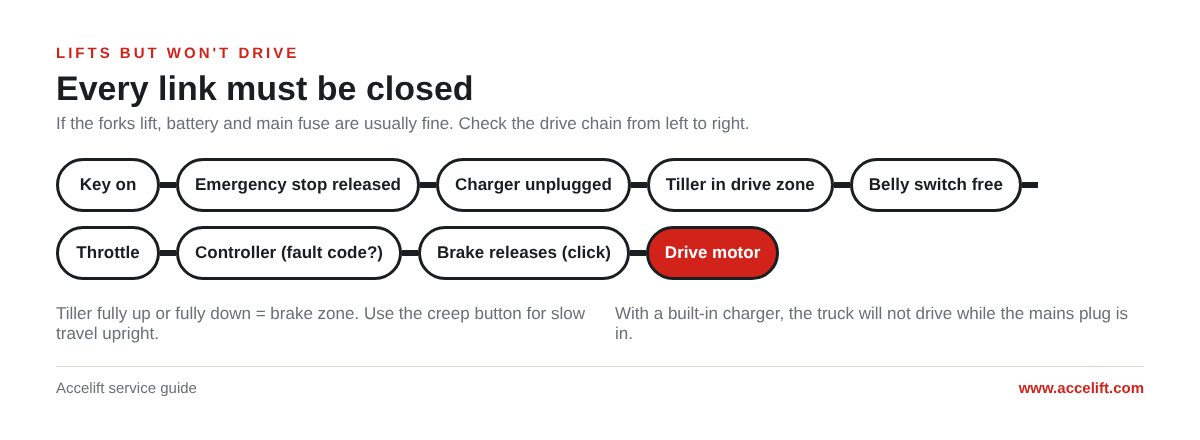
- Key switch on. Check the key is fully turned and the display lights up.
- Emergency stop released. On many trucks a pressed emergency stop also cuts lifting, but check it anyway: it takes a second.
- Charger unplugged. A truck with a built-in charger will not drive while the mains plug is in. That is an interlock, not a fault.
- Tiller in the driving zone. With the tiller fully up or fully down the truck is in the brake zone and will not drive. Many trucks have a creep or “turtle” button that allows slow travel with the tiller upright, which is also a quick test.
- Belly switch not stuck in. The reverse safety switch on the end of the tiller head stops the truck or drives it away from the operator when pressed. If it is stuck in, dirty or wet, the truck may refuse to drive. Press it and check it springs back freely.
- Platform and guard switches on stand-on trucks. A folding platform or side guards usually have switches of their own, and one not fully in position blocks drive.
- Throttle control. The butterfly control on the tiller head sends the speed and direction signal to the controller.
- Controller. Look for a flashing status LED or a code on the display before you switch anything off. More on this below.
- Drive fuse and drive contactor, where fitted. A blown drive fuse can leave lifting working.
- Electromagnetic brake releases. When you turn the throttle you should hear a click from the brake as it releases. No click usually means one of the links above is still open, or the brake itself has a fault.
- Drive motor. Suspect it last, once everything above checks out.
Read the controller before you switch off
The controller usually tells you where to look. Curtis and similar controllers flash a fault code on a status LED or show it on the display, and the code table is in the service manual. Count the flashes or write the code down before you turn the key off, because after a restart it may be gone.
Our SL15L3 and SL20L3 pedestrian pallet trucks, for example, use a Curtis controller, an electromagnetic brake and a reverse anti-collision switch on the tiller head.
The usual causes
Tiller switches and the tiller pivot
The switch that tells the controller the tiller is in the driving zone is often called the tiller switch or brake switch. It works every time the tiller moves, so it wears or goes out of adjustment, and the truck then drives only at certain tiller angles, or not at all. Look at the cables at the tiller pivot as well. The wires flex there every time the tiller goes up and down, and a broken core inside an undamaged sheath is a classic cause of drive that comes and goes.
Belly switch and throttle
A belly switch that sticks, or that has taken in water after the truck was washed or used outside in rain, keeps the drive blocked. A faulty throttle sensor gives the same result. Both sit in the tiller head and are normally replaced rather than repaired.
Electromagnetic brake
The brake is applied by springs and released by a coil when the truck is told to move. If the coil or its wiring fails, the brake disc is worn or the air gap is wrong, the brake does not release fully. The truck does not move at all, or it drags, labours and smells hot. Do not keep driving a truck that drags.
Drive motor
On DC drive motors, worn carbon brushes are a common cause once a truck has done a few years of work. AC motors have no brushes, but on AC trucks a fault in the motor speed sensor or its cable will stop drive, and the controller normally reports it with a code.
Something round the drive wheel
Stretch film and plastic strapping wind themselves round the drive wheel and axle and can jam it. With the battery disconnected, look under the truck and cut them away.
What you see, what it means
| What you see or hear | Likely cause | Check |
|---|---|---|
| No response at all to the throttle, no code | Key, emergency stop, charger plugged in, tiller in the brake zone | Work through the first four links of the chain |
| Status LED flashing or a code on the display | Controller has found a fault | Write the code down, look it up in the service manual |
| Drives only at some tiller angles, or cuts in and out | Tiller switch worn or out of adjustment, broken wire at the tiller pivot | Check the switch and its actuator, test the cables at the pivot |
| Will not drive after washing or work in the rain | Belly switch wet or stuck | Dry and free the switch, check it springs back |
| No brake click when the throttle is turned | An interlock still open, throttle fault, blown drive fuse | Go back along the chain, then test the throttle and fuse |
| Truck strains or drags and smells hot | Electromagnetic brake not releasing | Brake coil and wiring, air gap, disc wear |
| Drive wheel jammed | Film or strapping round the wheel | Battery off, cut it away |
Moving a truck that will not drive
A truck that will not drive still has to get to the workshop. Some electromagnetic brakes can be released by hand, so the truck can be pushed. With the brake released the truck has no brake at all, so take the load off, lower the forks and only do this on a level floor, never on a slope. Put the brake back to normal before the truck goes into service again.
If the truck lifts badly as well as not driving, start with our guide to an electric pallet jack not lifting, and if the battery will not take a charge, see electric pallet truck not charging. Our maintenance checklist catches many of these faults early.
Parts worth keeping on the shelf
For dealers and workshops, drive faults are where a small parts stock pays for itself: the customer wants the truck back the same day. For each pallet truck model you sell, keep:
- tiller head micro-switches, including the tiller (brake) switch and the belly switch;
- a throttle unit;
- an electromagnetic brake;
- fuses and a drive contactor;
- one controller per model.
We supply spare parts to our dealers, and our guide to spare parts for a new dealer covers a full starter kit. For parts or a quotation, contact us; if you want to sell and service our trucks, see our distributor programme.